The Inner Anatomy of a PDF: How Images Live Inside Documents
Most computer users perceive a Portable Document Format (PDF) file as a flat, digital printout—a virtual sheet of paper frozen in time. Underneath this visual presentation layer, however, the ISO 32000-1 specification defines an intricate, hierarchical object graph known as the Carousel Object System (COS). A PDF file is not a raster image collage; it is an object-oriented database compiled of cross-referenced nodes, dictionaries, content streams, and binary payloads.
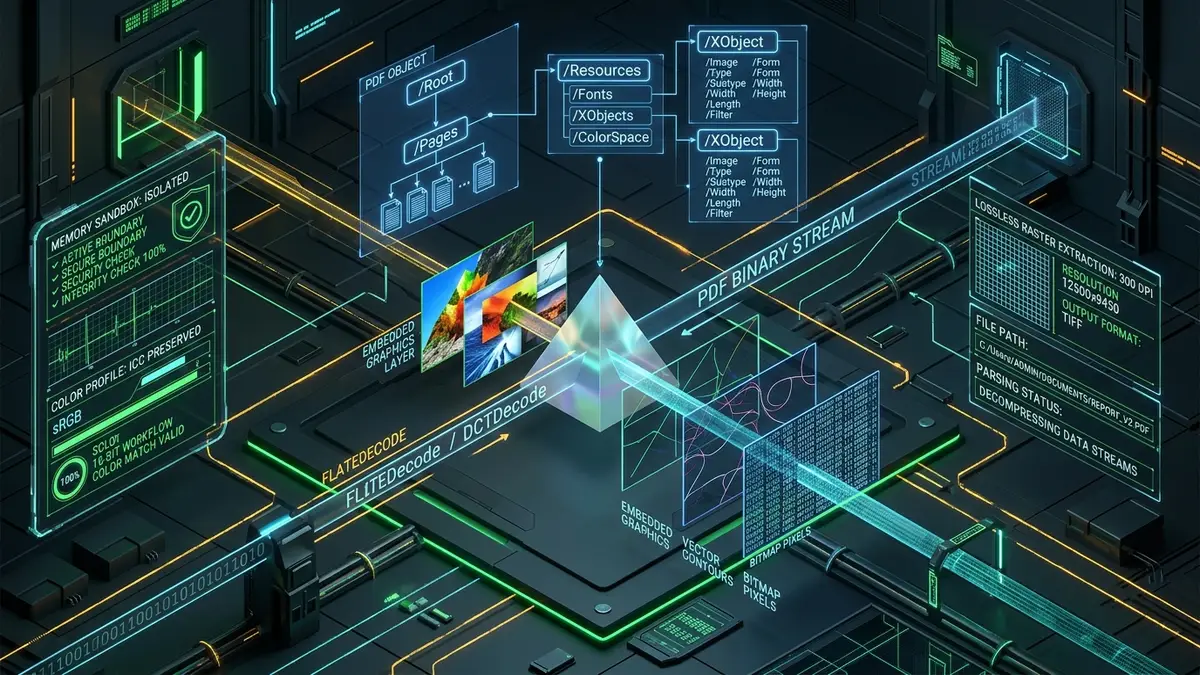
At the apex of this document architecture sits the Catalog dictionary (designated as /Root), which directs parsers to the document outline, metadata, and the hierarchical /Pages tree. As the PDF engine traverses down through individual page nodes, each page references a dedicated /Resources dictionary. Embedded graphical assets do not reside as loose attachments; they are declared within a child dictionary called /XObject (External Objects) with a type specifier of /Subtype /Image.
Each image XObject encapsulates critical technical attributes that define how raw pixel data must be interpreted:
- /Width and /Height: The intrinsic integer dimensions of the source master bitmap, completely decoupled from the display bounding box on the rendered page.
- /ColorSpace: Dictates whether pixel intensities map to
/DeviceRGB,/DeviceCMYK,/DeviceGray, or calibrated ICC profile color matrices. - /BitsPerComponent: The bit depth per color channel (typically 8-bit for photographs, 1-bit for scanned line art, or 16-bit for medical imagery).
- /Filter: The algorithmic compression filter used to encode the binary stream. Common filters include
/DCTDecodefor lossy baseline JPEG compression,/FlateDecodefor lossless zlib/deflate streams,/JPXDecodefor wavelet-based JPEG 2000 graphics, and/CCITTFaxDecodefor bitonal document scans. - /SMask (Soft Mask): An auxiliary 8-bit grayscale image stream that provides alpha channel transparency for PNG-like overlays.
When you use a dedicated extraction tool, the software navigates straight to these /XObject descriptors, bypasses all visual layout text runs, and reads the raw compressed binary stream directly from the file bytes. Understanding this architecture reveals why primitive extraction methods fail and why stream extraction is the gold standard for preserving digital media fidelity.
The Screenshot Trap: Why Snapping Your Screen Destroys Image Quality
When non-technical professionals need a chart, logo, or photograph trapped inside a PDF, their instinct is almost universally to zoom in on their screen, open a snipping utility, and crop a screenshot. While this technique takes seconds, it introduces severe, irreversible visual damage that compromises professional work.
The primary culprit is display rasterization limits. Desktop monitors display visual graphics at standard screen resolutions, usually 72 to 96 Dots Per Inch (DPI) on standard displays and roughly 144 to 220 DPI on high-density 4K or Retina panels. In contrast, corporate annual reports, technical whitepapers, and product packaging manuals routinely embed source master assets at 300 to 600 DPI to guarantee crisp commercial printing.
When you capture a screenshot, you are not capturing the image inside the PDF. You are capturing your operating system's rendering of that image through the lens of your monitor's pixel grid. The table below illustrates the destructive contrast between a manual display screenshot and bit-for-bit binary extraction:
| Technical Metric | Operating System Screenshot | Direct Stream Extraction (/XObject) |
|---|---|---|
| Effective Resolution (DPI) | 72 - 144 DPI (Screen-Bound) | 300 - 600+ DPI (Master Source Fidelity) |
| Native Pixel Dimensions | Constrained to viewport window size | Unbounded original dimensions (e.g. 4000 x 3000) |
| Color Profile Accuracy | Clipped to display sRGB gamut | Preserves embedded ICC profiles (AdobeRGB, CMYK) |
| Alpha Transparency Handling | Flattened onto solid white document background | Full 8-bit /SMask transparency channel preserved |
| Edge Clarity & Text Sharpness | Sub-pixel anti-aliasing blur and fringing | Zero interpolation artifacts; pixel-perfect edges |
In addition, taking screenshots burns valuable time when dealing with multi-page catalogs containing dozens or hundreds of graphics. By extracting the binary assets directly, you pull the original high-resolution master graphics in seconds, completely free of desktop clutter, cursor interference, or blurry resampling.
The Dark Side of Cloud PDF Converters: Data Leaks and Corporate Liability
Faced with the limitations of screenshots, many people turn to search engines and click the first free "PDF to Image Converter" or "Extract Images from PDF Online" result. What appears to be an innocent utility frequently conceals a major enterprise data liability.
Virtually all legacy online PDF conversion websites operate on a centralized server model. When you drag your PDF into their browser upload zone, your file travels over the public internet to an unvetted remote server. In our technical audits of commercial cloud converters at afolksdigital.com, we found that many conversion portals log incoming payloads, store unencrypted copies in multi-tenant cloud storage buckets, and retain files indefinitely under ambiguous terms of service.
If your PDF contains proprietary financial reports, architectural schematics, patient health data, customer personally identifiable information (PII), or confidential corporate roadmaps, uploading it to a free cloud converter violates key compliance frameworks:
- General Data Protection Regulation (GDPR): Article 28 prohibits transferring personal data to third-party processors without an explicit Data Processing Agreement (DPA) and verifiable encryption controls.
- Health Insurance Portability and Accountability Act (HIPAA): Medical PDFs containing embedded radiology scans or patient charts cannot be transferred to non-Business Associate certified endpoints.
- Corporate Non-Disclosure Agreements (NDAs): Transmitting pre-release product imagery or intellectual property to third-party conversion servers constitutes an unauthorized leak of trade secrets.
To eliminate these compliance hazards, organizations must replace cloud uploads with client-side utilities that process document streams entirely within the local browser sandbox.
Need to extract high-resolution photos, vector charts, or diagrams from sensitive PDF files? Our in-browser PDF to Image Extractor parses document object streams locally on your device. Your files never leave your computer, ensuring absolute confidentiality and top visual fidelity.
Architecture Comparison: Client-Side Browser vs. Cloud SaaS vs. CLI
Choosing an extraction method involves balancing security posture, technical accessibility, and processing speed. The comparison matrix below outlines how modern in-browser extraction compares to cloud-based converters, command-line utilities, and desktop suites:
| Extraction Method | Network Egress | Software Setup | Quality Retention | Privacy Risk Profile |
|---|---|---|---|---|
| Local In-Browser Client-Side (WebAssembly/PDF.js) | Zero (0 bytes transferred) | None (Runs instantly in web browser) | 100% Bit-for-Bit Master Extraction | Zero Risk (Sandboxed RAM) |
| Cloud Web Converters (Centralized SaaS) | Full document uploaded to cloud server | None (Requires browser upload) | Variable (Frequent lossy recompression) | High (Data retention & sniffing risks) |
| Poppler CLI Tools (pdfimages -png) | Zero (Local terminal execution) | High (Requires Homebrew, Linux packages, or MinGW) | 100% Bit-for-Bit Raw Extraction | Zero Risk (Air-Gapped Compatible) |
| Commercial PDF Desktop Editors (e.g. Acrobat Pro) | Low to Moderate (Syncs with Cloud Storage) | Heavy ($240+/year licensing & installer bloat) | High (Original streams preserved) | Moderate (Telemetry and cloud sync) |
For technical developers with terminal environments, tools like pdfimages offer exceptional fidelity. However, for everyday marketers, designers, legal teams, and executives, modern browser-based client-side tools provide the exact same air-gapped security and bit-for-bit quality without requiring terminal commands or expensive software subscriptions.
Step-by-Step Guide: Extracting High-Fidelity Images Locally in 4 Steps
To safely pull original images from any document using our client-side extraction suite, follow this standardized operational workflow:
Navigate to the PDF to Image Extractor in any modern web browser (Chrome, Edge, Firefox, Safari). To verify complete privacy before beginning, disconnect your Wi-Fi or inspect the Developer Tools Network tab—the application initializes and operates smoothly entirely offline.
Drag your target PDF directly into the drop zone. The browser uses the HTML5 File API and FileReader.readAsArrayBuffer() to mount the document into local RAM. If the document is protected by an open password, an in-browser prompt requests the key to decrypt the internal stream using standard AES cryptography without transmitting credentials.
Select your desired extraction mode depending on your objective. To retrieve embedded photographs and design assets at their original source resolution, select Extract Embedded Images. If your document features composite vector artwork, infographics, or styled typography layered over backgrounds, choose Render High-DPI Pages (300 DPI) to capture complete visual spreads with razor-sharp fidelity.
The client-side worker renders responsive image previews alongside their native pixel dimensions and color formats. You can inspect each extracted graphic individually or click Download All (ZIP) to save a clean archive directly to your local file system with zero data compression penalties.
Tackling Tough Edge Cases: Password Decryption, CMYK & Inline Masks
Working with professional PDF files often involves technical complexities that cause simple scripts to crash or produce unusable output. Understanding these edge cases ensures predictable results across every document format:
1. Inverted Colors and CMYK Color Space Conversion
Graphic designers preparing catalogs for physical offset printing routinely work in the CMYK (Cyan, Magenta, Yellow, Key/Black) color space. When an uncalibrated extraction tool pulls a CMYK stream and treats it as RGB, the resulting graphic displays bizarre, inverted, or overly saturated neon colors. Our browser engine handles this automatically by inspecting the /ColorSpace dictionary and applying an in-memory ICC transform matrix to remap 4-channel CMYK ink profiles into standardized sRGB color coordinates for flawless screen viewing.
2. Transparent Cutouts and Soft Masks (/SMask)
Unlike standalone PNG files that store RGBA data in a single interleaved stream, PDF specifications frequently separate color and transparency. The color image is stored as an RGB stream, while transparency is stored in a separate grayscale /SMask stream. Naive extractors dump the RGB asset with a solid black or white background, losing the cutout effect. Sophisticated client-side tools recombine the RGB buffer with the alpha mask using an OffscreenCanvas, generating a genuine transparent PNG.
3. Inline Images and Tiled Patterns
Small graphics, icons, and bullets are occasionally written directly into content streams using the BI (Begin Image), ID (Image Data), and EI (End Image) operators rather than separate /XObject references. Extracting these requires deep lexical parsing of page content tokens. Modern WebAssembly parsers isolate these micro-streams so no visual asset is missed.
Enterprise Security Compliance, Threat Audits & Ecosystem Strategy
In enterprise corporate environments, information security teams routinely enforce data loss prevention (DLP) filters on outgoing internet traffic. When employees use unapproved online utilities, DLP agents flag cloud uploads as anomalous data exfiltration events. By standardizing on zero-egress, client-side web utilities, organizations satisfy internal security guidelines while empowering teams with fast document tools.
At afolksdigital.com, our digital infrastructure consulting practice assists financial, healthcare, and e-commerce enterprises in implementing private, client-side document processing architectures. By eliminating external SaaS conversion subscriptions, companies cut licensing overhead while shielding confidential data from interception.
For financial analysts, risk managers, and quant traders calculating portfolio exposure, asset valuations, and currency conversion models from corporate SEC filings, our specialized financial tools at academy.afolksdigital.com offer secure, precision calculation engines designed for institutional workflows.
To train your internal engineering and IT compliance teams on sandboxed browser memory architectures, WebAssembly document parsing, and modern zero-trust asset pipelines, explore our comprehensive technical tutorials at learn.afolksdigital.com.