How to Watermark PDF Documents Offline Without Uploading: The Complete Zero-Trust Security Guide

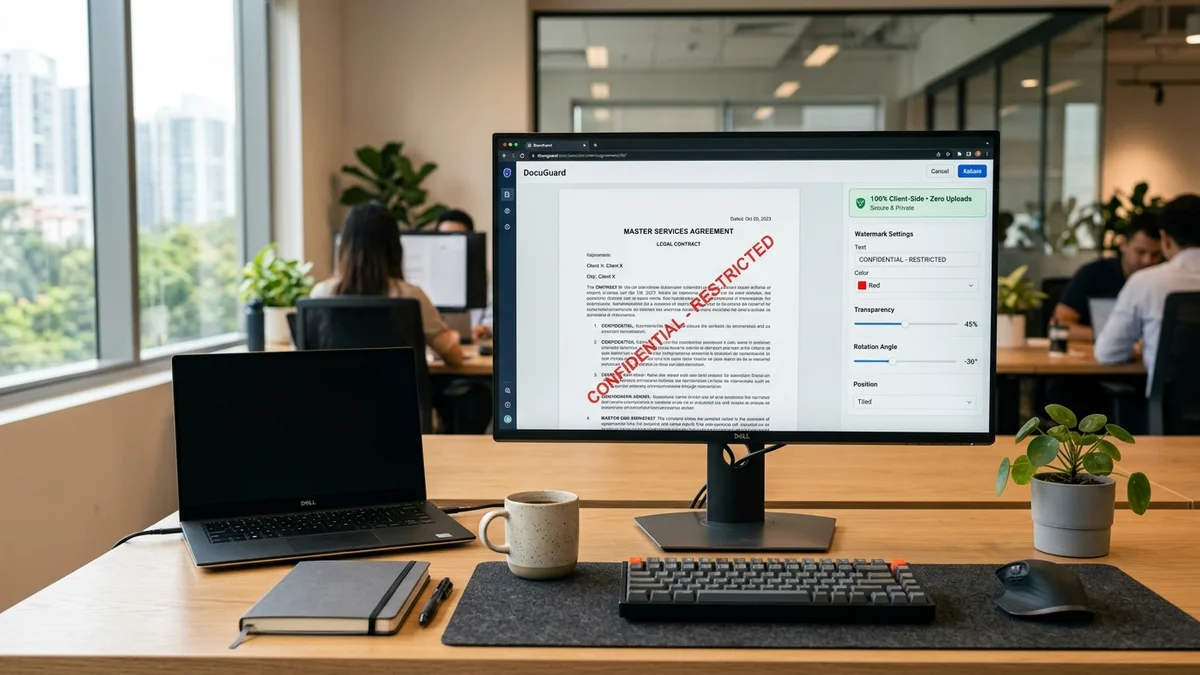
Quick Answer: How to Watermark PDFs Offline Without Cloud Exposure
Watermarking a PDF offline requires processing raw document byte arrays directly inside your local browser memory sandbox, completely bypassing remote cloud servers. Instead of risking intellectual property leaks or breaching strict corporate NDAs by sending files to third-party conversion websites, modern WebAssembly and JavaScript engines allow you to load documents into local RAM, calculate page geometry, embed font subsets, and permanently inject vector watermark instructions into the primary content stream (/Contents). Using our free Client-Side PDF Organizer & Security Engine, you can burn custom diagonal text stamps with adjustable opacity, protect trade secrets, and verify zero network activity using native browser inspection tools.
Table of Contents
- 1. The Cloud Watermark Trap: Data Retention, NDAs, and Privilege Waivers
- 2. Superficial Annotations vs Vector Content Streams: Why Fake Watermarks Fail
- 3. PDF Coordinate Systems: MediaBox, CropBox, and Affine Transformation Matrices
- 4. Alpha Transparency and Extended Graphics States: /ExtGState Deep Dive
- 5. Step-by-Step Practical Implementation: Complete In-Browser JavaScript Engine
- 6. Comprehensive Method Matrix: Client-Side Browser vs Acrobat Pro vs Cloud SaaS
- 7. Verification Protocols: Proving Zero-Egress with Browser DevTools and Air-Gaps
- 8. Frequently Asked Questions (FAQ)
1. The Cloud Watermark Trap: Data Retention, NDAs, and Privilege Waivers
Watermarking is fundamentally an act of defensive document governance. Whether stamping a pitch deck with "CONFIDENTIAL" before sharing it with prospective venture investors, marking a contract draft with "PRELIMINARY REVIEW", or applying employee email identifiers to internal roadmaps to prevent leaks, watermarks serve as legal deterrents. Yet, millions of professionals routinely undermine their entire security posture at the very first step: uploading these sensitive documents to public cloud watermarking websites.
Free online converters operate under business models prioritizing operational cost-efficiency over strict enterprise privacy. When you drag a sensitive PDF into a standard cloud web form, your unencrypted binary data leaves your device and traverses several layers of third-party network infrastructure. The underlying file stream is temporarily written to remote storage disks, passed to asynchronous worker pools, and processed within multi-tenant server environments.
Breach of Corporate Non-Disclosure Agreements
Standard non-disclosure agreements (NDAs) explicitly forbid transmitting proprietary materials to unauthorized third-party infrastructure. Uploading unreleased product roadmaps or financial forecasts to an unvetted consumer utility constitutes a contractual breach.
Server Caching and Forensic Persistence
Even when services state that files are removed after sixty minutes, web server access logs, reverse proxy crash dumps, automated snapshot backups, and edge cache arrays retain memory traces far beyond advertised deletion windows.
Regulatory Non-Compliance Liabilities
Under European Union GDPR, California CCPA, and healthcare HIPAA standards, transmitting personally identifiable information or medical records across unmonitored border proxies triggers mandatory incident disclosure protocols and administrative penalties.
For organizations managing enterprise risk, the resolution is clear: document protection mechanisms must operate under a strict zero-trust model. The document must never leave the boundary of the local CPU and volatile memory. For teams exploring comprehensive client privacy solutions, review our agency-level consulting frameworks at aFolksDigital, where zero-trust principles govern all digital workflow transformations.
2. Superficial Annotations vs Vector Content Streams: Why Fake Watermarks Fail
Not all watermarks are created equal. In the underlying specification governed by ISO 32000-1, there are two distinct ways to present text on top of an existing PDF page. Understanding this architectural dichotomy separates casual cosmetic stamping from robust cryptographic document control.
Architectural Comparison: PDF Annotations vs Content Stream Burning
Placed as an interactive form field or free-floating text annotation. The underlying document content remains completely detached. Anyone using Adobe Reader, Apple Preview, or a browser inspector can right-click, select, and press Delete in under two seconds.
Injected directly into the page's primary drawing instruction stream. The glyphs become an inseparable vector object woven alongside paragraphs, lines, and curves. It cannot be selected or deleted as a standalone entity without binary destruction.
Many quick online utilities and naive scripts choose the annotation approach because it avoids parsing the page content stream. However, this creates a dangerous illusion of security. If you distribute a sensitive contract marked with an annotation watermark, any recipient can open the file in Inkscape, Illustrator, or an open-source PDF viewer, highlight the watermark bounding box, and strip it entirely before redistributing your work anonymously.
In contrast, permanent client-side watermarking decompiles the page dictionary, accesses the /Contents object, appends low-level PostScript-like vector operators, embeds the TrueType glyph contours, and re-indexes the document's cross-reference table. The watermark becomes permanently burned into the document substrate.
3. PDF Coordinate Systems: MediaBox, CropBox, and Affine Transformation Matrices
To position a diagonal watermark across the dead center of a document page without clipping text or misaligning across different page sizes, you must understand how PDF geometry operates. Unlike web CSS, which places the coordinate origin (0, 0) at the top-left corner with the Y-axis pointing downwards, PDF coordinate systems are standard Cartesian grids where the origin (0, 0) rests at the bottom-left corner with Y pointing upwards.
All measurements in PDF files are defined in typographical points, standardized at 1/72 of an inch:
- US Letter Format: 8.5 × 11 inches corresponds to
612 × 792 points. - ISO A4 Standard: 210 × 297 millimeters corresponds to
595.28 × 841.89 points. - MediaBox vs CropBox Discrepancies: The
/MediaBoxrepresents the full sheet size, while/CropBoxdefines the visible clipping window. If a scanned document has a CropBox offset like[36, 36, 576, 756], placing text relative to raw MediaBox bounds causes the watermark to appear off-center or clipped.
When drawing a diagonal watermark at an angle (typically 45 degrees), PDF engines employ affine transformation matrices using the cm (current transformation matrix) operator. The mathematical transformation mapping local glyph coordinates (x, y) to transformed page coordinates (x', y') is defined by:
| -sin(θ) cos(θ) 0 |
| tx ty 1 |
Where tx and ty represent translation offsets to the visual center of the page. An intelligent client-side engine calculates the width and height of the target text string, computes the trigonometric rotation offset, and applies this matrix so the watermark settles symmetrically across portrait or landscape pages regardless of user screen scaling.
4. Alpha Transparency and Extended Graphics States: /ExtGState Deep Dive
A prominent issue with amateur watermarks is legibility: a pitch-black opaque stamp obscures underlying contract text, rendering the document unusable for review. Conversely, a watermark that is too faint provides zero photographic deterrence against smartphone screen captures. Achieving the ideal balance requires precise alpha transparency control.
In native PostScript, transparency did not exist—objects were strictly opaque. Adobe introduced the transparent imaging model in PDF 1.4 (ISO 32000-1 Clause 11). To apply an opacity value such as 15% or 25% to text without rasterizing the vector typography, the PDF engine must construct an Extended Graphics State dictionary (/ExtGState) in the page resources:
// Raw PDF 1.4 Extended Graphics State Object Definition
<<
  /Type /ExtGState
  /ca 0.18            // Non-stroking alpha (controls text fill transparency: 18%)
  /CA 0.18            // Stroking alpha (controls outline stroke transparency)
  /BM /Normal         // Blend mode: Normal (avoids color inversion on dark backgrounds)
  /AIS false          // Alpha is not shape
>>
When the client-side JavaScript engine draws text, it invokes this state using the /GS1 gs operator. The vector renderer dynamically alpha-blends the glyph color against underlying document artwork using hardware-accelerated composition buffers. This ensures that whether the document contains scanned TIFF images, TrueType fonts, or vector blueprints, the watermark hovers cleanly above the page while retaining 100% legibility of every clause underneath.
5. Step-by-Step Practical Implementation: Complete In-Browser JavaScript Engine
Building a reliable, zero-leak client-side watermarker is straightforward using modern browser standards and the high-performance pdf-lib binary parser. The engine operates entirely inside the user's browser runtime. It takes a local file input, extracts the raw binary buffer, processes every page stream, and outputs a downloadable file without firing a single HTTP packet.
Below is the complete, self-contained implementation demonstrating how to burn a diagonal, semi-transparent watermark into every page of an arbitrary PDF:
// Zero-Trust Client-Side PDF Watermarking Engine
import { PDFDocument, rgb, degrees, StandardFonts } from 'pdf-lib';

/**
 * Applies a permanent vector watermark to an in-memory PDF buffer.
 * @param {ArrayBuffer} fileBuffer - Raw binary bytes of uploaded PDF
 * @param {Object} options - Watermark parameters
 * @returns {Promise<Uint8Array>} Watermarked PDF bytes
 */
async function watermarkPdfOffline(fileBuffer, options = {}) {
  const {
    watermarkText = 'CONFIDENTIAL - RESTRICTED',
    opacity = 0.18,
    fontSize = 46,
    rotationAngle = 45,
    color = { r: 0.85, g: 0.15, b: 0.15 } // Default security crimson
  } = options;

  // 1. Parse document byte stream directly in browser memory
  const pdfDoc = await PDFDocument.load(fileBuffer, { ignoreEncryption: false });

  // 2. Embed standard Helvetica Bold font subset
  const font = await pdfDoc.embedFont(StandardFonts.HelveticaBold);
  const pages = pdfDoc.getPages();

  // 3. Process each page sequentially
  for (let i = 0; i < pages.length; i++) {
    const page = pages[i];
    const { width, height } = page.getSize();

    // Measure exact typographical bounding box
    const textWidth = font.widthOfTextAtSize(watermarkText, fontSize);
    const textHeight = font.heightAtSize(fontSize);

    // Calculate rotation trigonometry to center the text
    const rad = (rotationAngle * Math.PI) / 180;
    const cos = Math.cos(rad);
    const sin = Math.sin(rad);

    // Compute center translation offsets
    const centerX = width / 2;
    const centerY = height / 2;

    // Offset the text so its center of mass aligns with the page center
    const originX = centerX - (textWidth / 2) * cos + (textHeight / 2) * sin;
    const originY = centerY - (textWidth / 2) * sin - (textHeight / 2) * cos;

    // 4. Inject vector drawing commands into the /Contents stream
    page.drawText(watermarkText, {
      x: originX,
      y: originY,
      size: fontSize,
      font: font,
      color: rgb(color.r, color.g, color.b),
      opacity: opacity,
      rotate: degrees(rotationAngle)
    });
  }

  // 5. Serialize and return modified PDF binary stream
  const modifiedPdfBytes = await pdfDoc.save();
  return modifiedPdfBytes;
}

// Example: Trigger local file download without backend communication
function downloadBuffer(uint8Array, filename = 'watermarked-document.pdf') {
  const blob = new Blob([uint8Array], { type: 'application/pdf' });
  const downloadUrl = URL.createObjectURL(blob);
  const a = document.createElement('a');
  a.href = downloadUrl;
  a.download = filename;
  document.body.appendChild(a);
  a.click();
  document.body.removeChild(a);
  URL.revokeObjectURL(downloadUrl);
}
Because this function executes entirely within the browser's JavaScript execution thread, the file never touches a network interface card. If your development team requires advanced technical tutorials on frontend security, check our developer knowledge base on the aFolks educational platform.
Need to Watermark, Merge, or Protect PDFs Offline Right Now?
Protect your trade secrets with our zero-trust suite. Watermark contracts, lock permissions, and organize multi-page productions inside your browser memory with zero network egress.
Open Private PDF Suite →6. Comprehensive Method Matrix: Client-Side Browser vs Acrobat Pro vs Cloud SaaS
When choosing a document security workflow, organizations must balance privacy, convenience, software licensing costs, and operational speed. The comparison below evaluates the three primary approaches:
| Evaluation Parameter | Client-Side Browser (Local RAM) | Enterprise Desktop (Acrobat Pro) | Public Cloud Converters |
|---|---|---|---|
| Data Privacy Guarantee | 100% Air-Gapped (Zero Packets Sent) | Local Device (Cloud telemetry must be disabled) | Zero Privacy (Remote server transmission) |
| Annual Cost per Seat | $0 (Free Open Web Standard) | $240 – $360 per seat per year | Freemium / $120 annual subscription |
| Watermark Permanence | Permanent Vector Injection (/Contents) | Permanent Vector Injection | Often superficial annotation (/Annots) |
| Platform Cross-Compatibility | Universal (Windows, macOS, Linux, ChromeOS) | Windows & macOS binaries only | Any device with an active internet connection |
| Preservation of Text & OCR | 100% Vector (Zero rasterization) | 100% Vector (Preserves OCR layers) | Frequent raster compression down to 150 DPI |
| Processing Latency | Instantaneous (Local CPU execution) | Fast native execution | Slow (Dependent on upload/download bandwidth) |
7. Verification Protocols: Proving Zero-Egress with Browser DevTools and Air-Gaps
In high-security environments—such as corporate finance, defense contracting, or proprietary patent engineering—trusting marketing promises is unacceptable. Security engineers must independently verify that an in-browser utility does not leak data. You can conclusively confirm zero-egress behavior using standard operating system and browser diagnostic tools.
The Three-Step Air-Gap Audit Protocol
- Browser Developer Tools Network Inspection: Press
F12or right-click and choose Inspect, then navigate to the Network tab. Check the Preserve log option. Select your PDF document and trigger the watermark operation. The Network tab will register zero outgoing HTTP requests, POST payloads, or WebSocket handshakes. - The Airplane Mode / Physical Disconnect Test: Once the web page is loaded into your browser, disconnect your workstation completely from the internet (enable Airplane Mode or unplug your Ethernet cable). Now, drag your PDF into the tool and watermark it. Because the entire JavaScript bundle resides in browser cache, the tool continues to operate flawlessly with zero connectivity.
- Cryptographic Hash Integrity Verification: Before and after document processing, calculate the document checksums using our client-side Forensic SHA-256 Hash Validator. Logging these hash values creates an unalterable audit record confirming that only expected vector watermark objects were added.
For financial institutions and algorithmic asset managers requiring rigorous audit standards, visit our institutional portal at aFolks Trading Academy, where quantitative risk governance and forensic validation principles are taught in depth.
8. Frequently Asked Questions (FAQ)
Why is uploading confidential PDFs to online watermarking websites dangerous?
When you upload sensitive files such as executive pitch decks, financial audits, patent filings, or employment contracts to public conversion portals, those documents leave your secure boundary and land on third-party remote servers. Free portals frequently store incoming file streams in unmonitored cache directories, temporary worker disks, or cloud storage buckets. This creates direct exposure to data scraping, regulatory non-compliance under GDPR and HIPAA, and potential breach of corporate non-disclosure agreements.
How does offline browser watermarking burn text into a PDF without internet access?
Client-side watermarking relies on modern WebAssembly and JavaScript binary byte-stream parsers such as PDF-Lib. The browser loads the raw PDF into local device RAM as an ArrayBuffer. The engine parses the PDF cross-reference table, injects affine transformation matrices and graphics state dictionaries directly into page content streams (/Contents), embeds font subsets, and compiles a fresh binary payload entirely inside your local CPU and memory sandbox.
What is the difference between an annotation watermark and a vector content stream watermark?
Annotation watermarks are stored as interactive form widgets or floating annotations (/Annots) that sit on top of the page. Any recipient with standard PDF software can select, modify, or delete them in seconds. Vector content stream watermarks (/Contents) are written directly into the core graphic instructions of the page alongside native text and graphics, making them permanent and impossible to strip without deconstructing the binary document structure.
Can an offline watermark be applied diagonally with custom opacity?
Yes. By declaring an Extended Graphics State (/ExtGState) resource with specified alpha stroke and fill parameters (/ca and /CA set between 0.1 and 0.3), the client-side engine renders semi-transparent text. Combining this with 45-degree rotation matrices creates a legible, diagonal security stamp that protects intellectual property without obscuring the underlying document typography.
How can I mathematically verify that no document data was transmitted across the network?
Open your browser Developer Tools (F12) and inspect the Network tab. Load the offline stamping utility, switch your workstation to Airplane Mode or physically unplug your Ethernet cable, and process a document. The client-side engine will parse, watermark, and download the finished file seamlessly while the network log shows zero outbound HTTP requests or websocket packets.
Will burning an offline watermark degrade scanned document quality or text OCR layers?
No. Traditional virtual printer drivers flatten entire pages into lossy 150 DPI raster images, destroying searchable text and OCR coordinates. Client-side vector stream injection preserves all underlying vector fonts, structural PDF tags, bookmarks, and image resolutions perfectly while appending fresh vector glyph instructions at native typographical resolution.