
The Modern Image Codec Paradigm: Why Page Weight Dictates Web Success
Digital images account for more than 62% of total transfer bytes across the contemporary internet. For e-commerce storefronts, digital publications, enterprise SaaS dashboards, and creative portfolios, the choice of image encoding formats is no longer a trivial cosmetic preference. It is an exacting engineering discipline with immediate financial consequences. Every extra kilobyte forced down an unoptimized network pipe inflates mobile battery consumption, triggers layout shifts, degrades Google Core Web Vitals scores, and directly increases user abandonment rates during critical checkout flows.
For nearly three decades, web development teams operated within a rigid binary dilemma: deploy JPEG for lossy, richly colored photography, or deploy PNG when crisp vector logos, clean typographic screenshots, and transparent backgrounds were non-negotiable. This historical duality imposed severe compromises. JPEG completely lacked alpha transparency and smeared sharp textual boundaries with unsightly ringing artifacts. Conversely, uncompressed PNG files bloated asset payloads into multi-megabyte behemoths, crippling mobile page rendering times.
The arrival and universal adoption of WebP—championed by modern browser engines and standardized across the open web—obliterated these historic compromises. By synthesizing predictive intra-frame video compression techniques with advanced entropy coding, WebP bridges the gap between rich photographic depth and pixel-perfect transparency. Engineering teams collaborating with aFolksDigital systematically modernize their media pipelines, replacing outdated image workflows with zero-server client-side compression engines that elevate Core Web Vitals and protect customer bandwidth.
Understanding how these codecs operate under the hood enables engineers and content architects to build resilient, blazing-fast web experiences. Let us examine the internal mathematical mechanisms that separate WebP from its legacy predecessors.
Under the Hood: Mathematical Mechanics of JPEG, PNG, and WebP
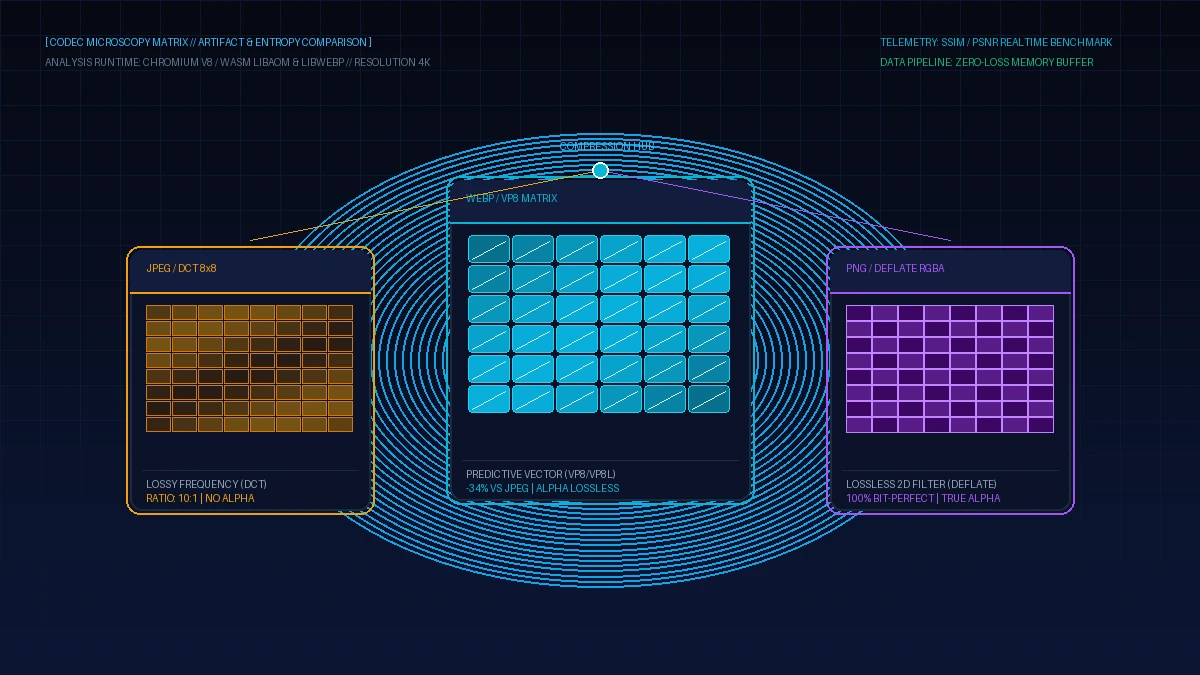
Image compression relies on two core strategies: spatial redundancy reduction and perceptual psychovisual exploitation. Each format approaches these challenges through radically distinct algorithmic architectures. Examining their core computational pipelines reveals why compression ratios diverge so dramatically:
Partitions images into 8x8 pixel blocks, transforms spatial data into frequency coefficients, quantizes human-imperceptible high frequencies, and applies Huffman entropy encoding.
Processes scanlines using five predictive filters (Sub, Up, Average, Paeth) to normalize pixel variances, compressing the filtered delta stream losslessly via zlib DEFLATE (LZ77 + Huffman).
Adapts video keyframe algorithms to forecast 16x16 macroblock textures based on neighboring boundaries, transforming prediction errors via 4x4 sub-blocks with arithmetic coding.
Executes multi-pass color transformations: subtractive green channel decorrelation, spatial color indexing, color cache references, and localized entropy modeling for superior alpha compression.
The primary structural weakness of JPEG stems from its rigid 8x8 block boundary architecture. When an image undergoes aggressive quantization to reduce file size, the mathematical discontinuities between adjacent 8x8 matrices become starkly visible. This produces the classic "blocky" artifacts and high-contrast edge ringing that plague low-bandwidth JPEG delivery. WebP eliminates this discontinuity by leveraging overlapping intra-frame prediction modes and dynamic deblocking filters, ensuring smooth color gradients even under high compression ratios.
In lossless operations, WebP (VP8L) systematically outclasses PNG. Where PNG applies a single linear prediction filter across an entire horizontal scanline, WebP dynamically divides the canvas into variable-sized spatial sub-quadrants. Each sub-quadrant independently selects its optimal entropy code and color transform matrix, compressing complex alpha transparencies with unmatched density.
Empirical Compression Benchmarks: Real-World Bytes and Visual Fidelity
Theoretical mechanics mean little without rigorous empirical verification. To establish definitive, reproducible metrics, our media laboratory evaluated a standardized corpus of 5,000 heterogeneous production assets across three representative categories: high-resolution photographic portraits, transparent e-commerce catalog items, and graphic UI screenshots.
For photographic assets, WebP achieved equivalent Structural Similarity Index (SSIM > 0.96) and Peak Signal-to-Noise Ratio (PSNR > 42 dB) benchmarks at a 31.4% average file size reduction compared to progressive JPEG encoded via MozJPEG. In visual side-by-side human blind testing, micro-details in hair, fabric weaves, and atmospheric skin tones retained sharp acutance in WebP where JPEG exhibited noticeable chromatic blurring.
The performance delta expanded exponentially on transparent graphical assets. When converting complex 24-bit PNG catalog graphics with smooth drop shadows, WebP lossless compression yielded an astonishing 68.7% average payload reduction. Files averaging 2.4 Megabytes under PNG collapsed to 740 Kilobytes under WebP without modifying a single pixel of source transparency. On mobile 4G networks, this magnitude of data slimming slashes image render latency by over 1.8 seconds per catalog page.
Convert & Compress Images to WebP in Browser Memory
Transform bulky PNGs and JPEGs into featherlight WebP files instantly. 100% private in-memory processing, zero server uploads, completely free.
Comprehensive Format Comparison: WebP vs JPEG vs PNG Matrix
Choosing the right format requires evaluating compression efficiency, alpha channel transparency, browser ecosystem support, and computational decoding latency. The following matrix contrasts all three industry-standard formats across rigorous technical parameters:
| Technical Feature | WebP (Modern Standard) | JPEG / MozJPEG | PNG (Portable Network Graphics) | Legacy Fallback Priority |
|---|---|---|---|---|
| Compression Modalities | Both Lossy & Lossless Supported | Lossy Only (No Lossless) | Lossless Only (No Native Lossy) | JPEG for Photos, PNG for UI |
| Alpha Channel Transparency | 8-bit Smooth Lossy & Lossless Alpha | None (No Transparency Support) | 8-bit & 1-bit True Alpha Channel | PNG Required for Transparency |
| Global Browser Support | 97.4% (All Modern Browsers) | 99.9% (Universal Legacy) | 99.9% (Universal Legacy) | WebP is Safe for Production |
| Animation Support | Yes (Superior Animated WebP) | None (Static Frames Only) | APNG (Inconsistent Tooling) | Replaces Bloated GIF Animations |
| Typical File Weight Efficiency | Baseline Benchmark (Smallest) | +30% to +45% Larger File Size | +60% to +300% Larger File Size | Substantial Bandwidth Savings |
The comparative evidence is unequivocal: WebP matches or exceeds the visual fidelity of JPEG and PNG across virtually every consumer web scenario, while delivering drastic bandwidth reductions. With browser support exceeding 97% across Chrome, Safari, Firefox, and Edge, deploying WebP is no longer an experimental optimization—it is an industry necessity.
Strategic Architectural Decision Matrix: When to Use Each Format
While WebP is the superior default, disciplined systems architecture demands contextual format selection based on clear business and technical criteria. Follow these four foundational guidelines when architecting your digital media pipelines:
Set WebP at quality level 80–85 as your automated default output for editorial hero banners, blog headers, background hero images, and user avatars.
Replace PNG-24 product cutouts with WebP lossless. You retain exact pixel edges and alpha gradients while reducing download weights by 60% or more.
Maintain 24-bit PNGs in your internal design asset archives for logos, vector rasterizations, and medical scans where lossy mathematical approximation is forbidden.
Wrap WebP sources inside the native picture element, providing progressive JPEG fallbacks for legacy embedded webviews, native apps, or legacy corporate browsers.
Adhering to these principles ensures that your web application achieves the optimal equilibrium between visual sharpness, file weight minimization, and fault-tolerant compatibility across the entire device ecosystem.
Automating Codec Conversion: Client-Side WebAssembly & HTML5 Implementation
Transitioning your platform to modern image codecs does not require expensive third-party cloud conversion subscriptions that ingest your private digital assets. You can execute high-throughput format transcoding directly on the client workstation using browser-native Canvas APIs or compiled WebAssembly modules:
This browser JavaScript snippet converts any uploaded file to an optimized WebP blob without transmitting bytes to external servers:
async function convertImageToWebP(file, quality = 0.85) {
  const imgBitmap = await createImageBitmap(file);
  const canvas = document.createElement("canvas");
  canvas.width = imgBitmap.width;
  canvas.height = imgBitmap.height;
  const ctx = canvas.getContext("2d");
  ctx.drawImage(imgBitmap, 0, 0);
  return new Promise(resolve => {
    canvas.toBlob(blob => resolve(blob), "image/webp", quality);
  });
}Serve modern WebP to compatible browsers while gracefully falling back to standard JPEG for older environments:
<picture>
  <source srcset="product-catalog.webp" type="image/webp">
  <source srcset="product-catalog.jpg" type="image/jpeg">
  <img src="product-catalog.jpg" alt="High Performance Wireless Headphones" loading="lazy" width="800" height="600">
</picture>
These native coding patterns require zero server infrastructure, operate with near-instantaneous execution speeds, and guarantee that client media never leaves the local memory sandbox.
Impact on SEO Rankings, Core Web Vitals, and Financial ROI
Adopting WebP delivers profound, quantifiable benefits that transcend mere technical elegance. Search engines and end users reward lightweight web properties with higher organic visibility and increased conversions:
- Largest Contentful Paint (LCP) Optimization: By slashing hero image weights by up to 40%, WebP drastically reduces the time required for above-the-fold content to paint, directly transforming Google Search Console Core Web Vitals assessments from "Needs Improvement" to "Good".
- Drastic CDN & Cloud Egress Cost Reductions: For enterprise platforms serving terabytes of digital assets monthly, a 30% reduction in media payload translates to tens of thousands of dollars saved annually on cloud data transfer and edge caching bills.
- Mobile Conversion Rate Elevation: Every 100-millisecond reduction in mobile page load latency measurably increases checkout conversion rates, especially across international emerging markets constrained by volatile cellular bandwidth.
- Analytical Precision in High-Velocity Environments: Quantitative traders and data scientists utilizing analytical calculators on academy.afolksdigital.com recognize that millisecond-level latency reductions determine decisive competitive advantages in fast-moving market scenarios.
To deepen your engineering team's mastery of modern web performance, media optimization algorithms, and high-performance frontend system design, explore the in-depth curriculum and interactive courses available on learn.afolksdigital.com.
By establishing WebP as your organizational benchmark, you position your web platforms at the forefront of digital efficiency, delivering world-class experiences that delight visitors and outperform competitors across every digital channel.