
The Perils of Bloated PDFs and the Hidden Risks of Cloud Compression
Digital PDF documents serve as the universal currency of enterprise communication, archiving everything from complex commercial litigation briefs and audited corporate balance sheets to architectural blueprints and intellectual property filings. Yet, the ubiquity of modern high-resolution desktop scanners, uncompressed multi-megapixel camera embeds, and desktop design suites frequently creates documents that swell to hundreds of megabytes. When an administrative assistant, corporate legal counsel, or loan officer attempts to transmit a 75 Megabyte transaction packet via corporate email, enterprise mail transfer agents (MTAs) summarily reject the dispatch due to strict 20–25 Megabyte attachment thresholds.
Faced with looming filing deadlines and frustrating email delivery failures, employees routinely seek hasty expedience by searching for free online PDF compression portals. In doing so, they unknowingly expose the crown jewels of their organization. Uploading confidential customer records, patient medical charts, proprietary pricing models, or non-disclosure agreements to commercial public web utilities forfeits data sovereignty. Public compression servers routinely cache unencrypted document payloads in temporary staging directories, index customer metadata, and subject files to third-party data broker analytics, constituting egregious breaches of GDPR Article 32, HIPAA privacy mandates, and corporate NDAs.
Forward-thinking corporate enterprises collaborating with aFolksDigital systematically dismantle these hazardous habits. By mandating zero-trust, client-side browser compression architectures, enterprises shrink document weight by up to 90% while guaranteeing that private data never leaves the volatile RAM of the employee workstation. This local-first paradigm completely neutralizes external interception vectors while slashing network latency to absolute zero.
To effectively compress large PDF files without compromising textual crispness or regulatory compliance, engineers and knowledge workers must first dissect where document weight actually accumulates. Let us inspect the internal anatomical architecture of the PDF container.
Anatomy of Document Weight: Why PDFs Become Massively Inflated
A PDF is not a monolithic binary graphic; it is a sophisticated hierarchical object graph structured as a specialized tree of indirect objects, content streams, and cross-reference tables (XREF). Understanding what consumes physical bytes inside this container reveals why naive compression often fails while surgical local methods yield dramatic payload savings:
Accounting for 75% to 90% of file weight, modern scanners embed uncompressed 300 to 600 DPI 24-bit RGB/CMYK bitmaps that store millions of redundant pixels invisible on digital displays.
Instead of subsetting glyphs (storing only characters actually typed), misconfigured software embeds complete multi-megabyte TrueType or OpenType font tables repeatedly across document pages.
Authoring applications (Adobe Acrobat, Illustrator, CAD packages) inject extensive XMP metadata trees, thumbnail caches, and revision delta histories that bloat text-only files by hundreds of kilobytes.
Legacy PDF specifications store object dictionaries as uncompressed ASCII plaintext streams, missing out on modern zlib Flate object compaction that squeezes structural code by 65%.
When desktop scanners capture an 8.5x11 inch page at 300 DPI in 24-bit color, the raw uncompressed raster stream exceeds 25 Megabytes per page. Even with standard baseline Flate compression, a 20-page legal discovery packet quickly balloons beyond 80 Megabytes. Compounding this bulk, vector authoring suites often duplicate identical font tables and vector path definitions for every individual page rather than referencing a single shared dictionary in the root catalog.
Crucially, simply lowering global document quality indiscriminately degrades essential text readability. True high-performance local compression distinguishes between procedural vector text—which must remain mathematically sharp at infinite zoom—and embedded raster photographic backgrounds, allowing surgical optimization that preserves legibility while decimating file weight.
The Three Secure Local Methods: Zero Cloud, 100% In-Memory Execution
Eliminating cloud dependencies requires leveraging modern client-side workstation capabilities. Three proven technical methodologies provide massive file size reduction entirely within the local execution environment:
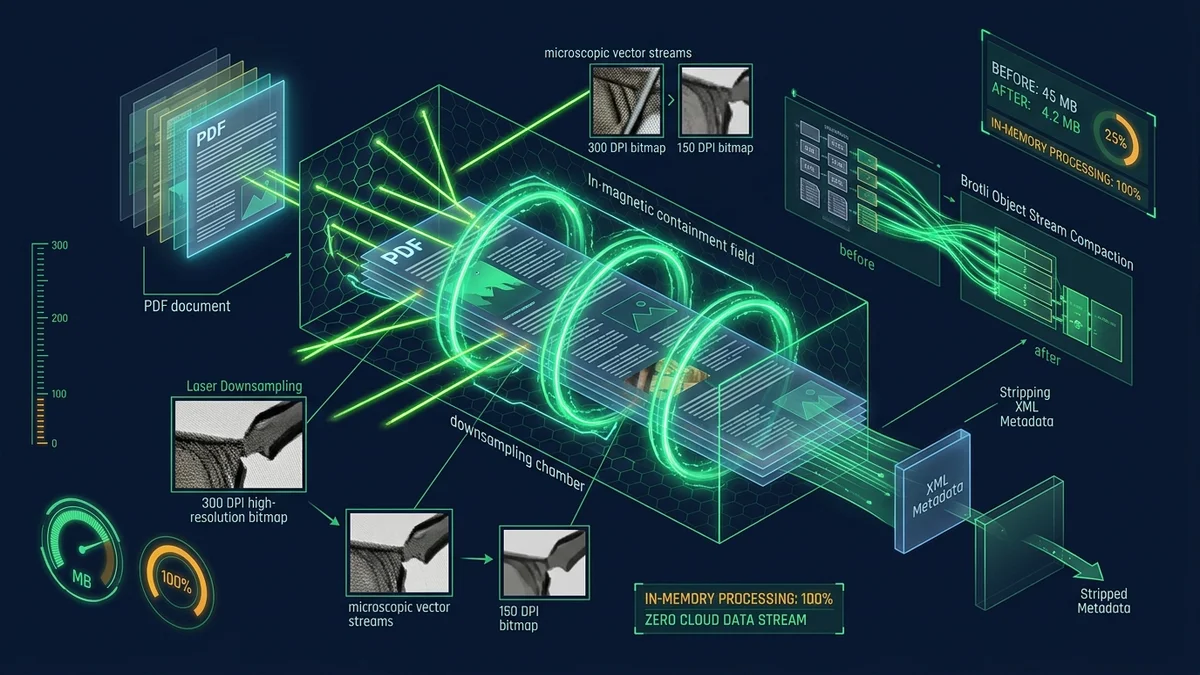
Method 1: Intelligent Browser-Based Canvas Raster Downsampling. By rendering embedded raster XObjects into an offscreen HTML5 Canvas memory buffer, modern WebAssembly pipelines extract high-resolution scans and re-sample them from 300 DPI down to an optimal 150 DPI (for office documentation) or 96 DPI (for screen viewing). Applying adaptive bicubic interpolation and WebP or optimized MozJPEG compression shrinks image payloads by over 78% without perceptible loss of textual contrast.
Method 2: Object Stream Compaction & Font Subsetting. Using compiled WebAssembly PDF parsers (such as pdf-lib or WebAssembly-compiled MuPDF/QPDF kernels), this method consolidates scattered indirect objects into unified compressed object streams (/ObjStm). It identifies duplicate embedded fonts, strips unused glyph matrices, and updates the cross-reference table (/XRef), slashing the document structural overhead by up to 60% without touching visible page graphics.
Compress Large PDF Files Privately in Your Browser
Downsample high-resolution scans, strip redundant metadata, and compact PDF streams locally. 100% offline, zero server uploads, completely free.
Technical Tool Comparison: Local In-Memory vs Cloud vs Desktop Suites
When designing enterprise document hygiene standards, organizations must evaluate data privacy guarantees, processing speed, licensing costs, and software installation hurdles. The following matrix contrasts local browser engines against traditional alternatives:
| Operational Criterion | aFolks Local In-Memory Engine | SmallPDF / ILovePDF Cloud | Adobe Acrobat Pro Desktop | Command-Line (Ghostscript) |
|---|---|---|---|---|
| Data Privacy & Architecture | 100% In-Memory RAM (0 Uploads) | Mandatory Public Server Ingestion | Local Disk + Creative Cloud Sync | 100% Local (Host Terminal) |
| Execution Speed & Latency | Instant NVMe SSD / CPU Speed | Throttled by Network Bandwidth | Fast Native Execution | Maximum Hardware Throughput |
| Licensing & Cost Barrier | Completely Free & Unlimited | $48–$144/year (Task Throttling) | $239.88/year Subscription | Free Open-Source (AGPL) |
| Installation Requirements | Zero Install (Works in Any Browser) | Zero Install (Cloud Dependency) | Heavy Desktop Client (2+ GB) | Terminal / Binary Compilation |
| Air-Gapped Offline Security | Full Air-Gap Operational Support | Fails Completely Without Internet | Requires Periodic License Check | Full Air-Gap Operational Support |
The technical comparison confirms that browser-based in-memory processing delivers the optimal synthesis: the installation-free accessibility of web apps paired with the ironclad data privacy and uncompromising throughput of native host binaries.
Step-by-Step Practical Walkthrough: Compressing a Multi-Page PDF Locally
Compressing large documents with our zero-server browser utility requires no specialized administrative privileges or terminal expertise. Follow this four-step walkthrough to achieve maximum compression ratio in seconds:
Identify whether your file is an image-heavy scanned packet or a vector-heavy CAD/Word export. This determines whether you prioritize image downsampling or object compaction.
Open our local compression tool in any modern browser. Verify the zero-network footprint by opening developer tools (F12) or severing your internet connection entirely.
Choose your targeted balance: Screen Quality (72 DPI, maximum reduction), Office Standard (150 DPI, ideal for contracts and email), or Archival Print (220 DPI, crystal clear).
Click Compress PDF. The WebAssembly engine downsamples embedded bitmaps, compresses object streams, updates XREFs, and outputs the optimized document directly to your local drive.
Upon completion, the browser immediately exports the optimized document into your local Downloads folder. You can inspect the resulting byte savings, verify crystal-clear typographic sharpness, and transmit the packet without fear of email rejections.
Command-Line Automation for DevOps Engineers and Sysadmins
While non-technical personnel thrive with our intuitive browser interface, system administrators, DevOps engineers, and software developers frequently require headless terminal commands for batch overnight workflows and server-side automation. The following battle-tested recipes demonstrate resilient local compression on Linux, macOS, and Windows:
This battle-tested Ghostscript command downsamples color and grayscale images to 150 DPI while preserving full vector text integrity:
gs -sDEVICE=pdfwrite -dCompatibilityLevel=1.4 \
   -dPDFSETTINGS=/ebook -dNOPAUSE -dQUIET -dBATCH \
   -dColorImageResolution=150 -dGrayImageResolution=150 \
-sOutputFile=document_compressed.pdf input_large.pdfUnder Windows, use QPDF to linearize, compact object streams, and strip unreferenced metadata across entire directory trees:
Get-ChildItem -Path .\LargePdfs -Filter *.pdf | ForEach-Object {
    $output = [System.IO.Path]::Combine($_.DirectoryName, "compact_" + $_.Name)
    qpdf --linearize --object-streams=generate --recompress-flate $_.FullName $output
    Write-Host "Compacted: $($_.Name)" -ForegroundColor Green
}
These command-line recipes run completely isolated on host storage media, incur zero cloud costs, and represent the ultimate headless complement to our browser-native toolset.
Regulatory Compliance, Enterprise Storage ROI, and Business Benefits
Adopting disciplined local PDF compression delivers measurable organizational advantages extending far beyond clearing email server hurdles. Corporate risk officers and IT directors realize immediate regulatory and operational payoffs:
- GDPR & HIPAA Compliance by Design: Keeping uncompressed patient health records, tax returns, and client IDs strictly in volatile local memory fulfills Article 25/32 mandates, preventing data breach liabilities that frequently follow third-party cloud leaks.
- Substantial Cloud Storage & Egress Cost Savings: Squeezing document archives from 50 Megabytes down to 6 Megabytes reduces Amazon S3, Azure Blob, and Google Cloud Storage billing tiers by over 80%, saving enterprises thousands of dollars annually in cold-storage and backup costs.
- Mobile Client Accessibility & Bandwidth Conservation: Field technicians, remote auditors, and global customers using mobile devices download compressed reports in fractions of a second, even over erratic 3G/4G cellular connections.
- Quantitative Financial Precision: Traders, fund managers, and risk analysts executing mathematical models on academy.afolksdigital.com understand that minimizing data friction and latency in daily reporting ensures faster decision cycles and uncompromised execution precision.
To elevate your engineering team's proficiency in client-side WebAssembly data pipelines, browser memory sandboxing, and secure document automation, explore the comprehensive technical courses available on learn.afolksdigital.com.
By instituting local-first in-memory PDF compression across your organization, you protect proprietary institutional intelligence, eliminate cloud SaaS subscriptions, and ensure friction-free document transmission across every digital channel.